How to set up prompt regression testing
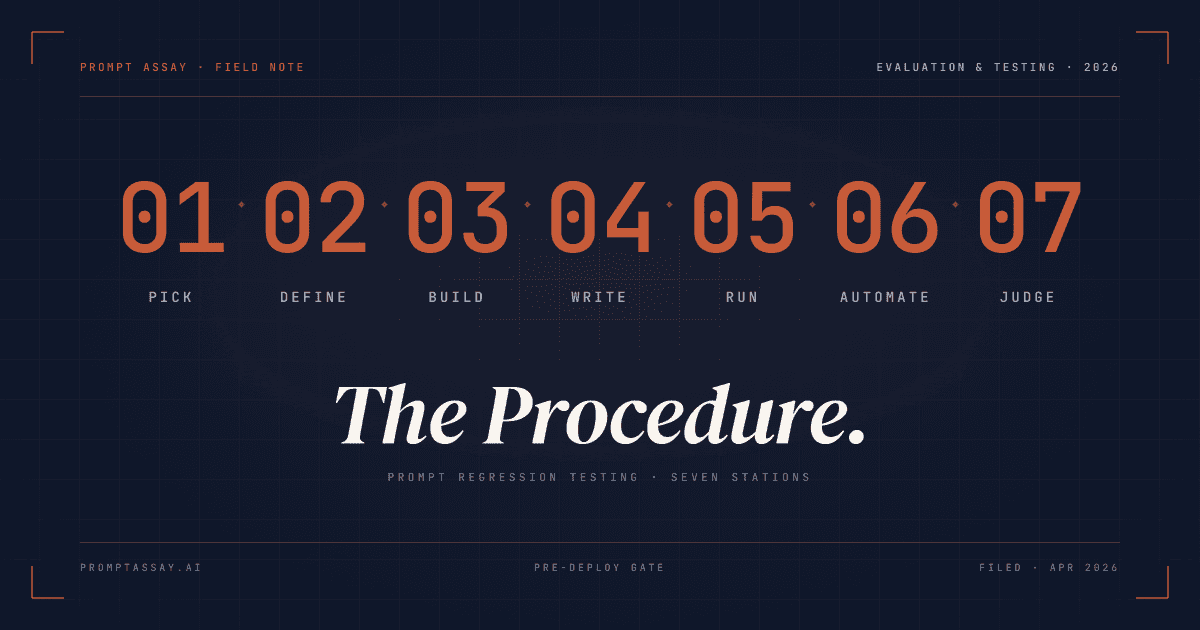
Prompt regression testing means running a fixed set of test cases against a prompt before each change ships, scoring each result against a rubric, and only deploying when the suite passes. It catches silent breakage from prompt edits and from upstream model updates the same way unit tests catch code regressions: a documented expectation that a change cannot violate.
On this page
What prompt regression testing is (and what it isn't)
A regression in production code is when a change you shipped broke something that used to work. Prompt regression testing is the same idea applied to system prompts. You maintain a fixed set of inputs (your golden dataset) and expected criteria (your rubric), and before any prompt change ships you re-run the dataset and confirm nothing got worse.
The discipline gets confused with drift detection often enough to be worth separating up front. Regression testing is a pre-deploy gate on a fixed dataset. Drift detection is post-deploy monitoring of live behavior over time, and it has its own playbook. Both are useful. They answer different questions ("did my edit break anything?" vs. "did the model start behaving differently in production?") and the rest of this guide is about the first one.
The seven steps below take you from "I have one important prompt and no testing discipline" to "I gate every change against a versioned suite." Steps 1 through 5 work at every tier of every prompt tool, including the free tier here. Step 6 is where automation enters the picture; eval suites are open at every tier on Prompt Assay including Free, so the only thing that gates you is whether your regression matrix has outgrown manual cadence. Step 7 is about fitting the discipline into your release process.
How to set up prompt regression testing in 7 steps
Setting up prompt regression testing is a seven-step sequence: pick your highest-stakes prompt, define what a good output is, build a golden dataset, write a scoring rubric, run a manual test pass, move to automated eval suites when manual scoring stops scaling, and add LLM-as-judge grading for subjective quality. Each step below expands one item in that sequence.
Pick the prompt that matters most
Start with the single prompt whose failure costs you the most. One prompt with a real suite beats ten prompts with one test case each.
Define what 'good' looks like
Before writing any test case, write down what a good output must be, contain, avoid, and how it should behave on edge cases.
Build the golden dataset
Author 8 to 20 test cases covering happy-path, edge, and adversarial inputs. Store them somewhere a
git pullcannot lose.Write a scoring rubric
Score each case with weighted criteria on a 0-to-1 scale. Every criterion is a yes/no check a human could perform in five seconds.
Run your first manual test
Score each case by hand the first time. Manual scoring surfaces the rubric ambiguities you missed when you wrote it.
Move to eval suites when manual stops scaling
Around 240 rubric checks per release, switch to automated eval suites. Suite creation is open on every Prompt Assay tier, including Free.
Add LLM-as-judge for subjective quality
For criteria like tone or readability, hand the output and rubric to a second model. Run the judge on a different model family from the prompt under test.
The rest of this guide expands each step with worked examples, scoring math, and the bias mitigations that keep LLM-as-judge honest.
Step 1: Pick the prompt that matters most
Don't try to test every prompt in your codebase on day one. Pick the one whose failure would cost you the most: the customer-facing classifier, the conversion-funnel rewrite, the revenue-attribution router. If you have ten prompts and zero test discipline, the right move is one prompt with a real suite, not ten prompts with one test case each.
The shape of "matters most" varies. For a customer-support team it's usually the triage classifier that decides whether a ticket goes to billing, technical, or refunds. For a content team it's the draft rewriter that touches every piece before publish. For an internal-tools team it's whichever prompt sits in the synchronous request path of a user-facing feature.
Pick one. The discipline you build around it generalizes. The time you spend on it doesn't compete with feature work the way "test everything" does. Teams that build a hardened test suite around one prompt before a migration off Humanloop often credit that suite with what made the migration tractable.
Step 2: Define what "good" looks like
Before you write a single test case, write down what a good output looks like. This is the part teams skip and then regret three weeks later when their tests pass and the production behavior keeps drifting anyway.
Pull out a markdown file and answer four questions about your chosen prompt:
- What does the output need to be (a JSON object, a paragraph of prose, a numeric score, a tool call)?
- What does it need to contain (specific fields, certain keywords, references to the input)?
- What must it avoid (claims the product doesn't support, refusals on legitimate requests, outputs that change the JSON shape)?
- What does the edge case look like (the angry refund request, the ambiguous classification, the user input that's mostly emoji)?
If you've used a structured critique tool, you have a starting vocabulary. Prompt Assay's six-dimension critique uses Clarity, Completeness, Structure, Technique Usage, Robustness, and Efficiency, and any of those can become a rubric criterion. Other useful starting vocabularies live in the 60-technique field guide under the families that match your prompt's job (classification, rewriting, extraction, agentic). The point isn't the framework you pick. The point is that "good" is concrete and written down before the test cases are.
Step 3: Build the golden dataset
Now write the test cases. Aim for 8 to 20 to start. You can always add more, and you'll add them anyway as you discover edge cases in production.
Each case is two things: an input (the user turn for a chat-style prompt, or the variable bindings for a template prompt) and a set of expected criteria (the rubric items from Step 2, attached to this specific case). Cover three families of cases:
- The happy path: typical inputs the prompt was designed for. Three or four cases.
- The edge cases: unusual inputs that have specific desired behavior. Five to ten cases. These are where regressions hide.
- The adversarial cases: inputs designed to make the prompt fail (jailbreak attempts, prompt-injection probes, intentionally ambiguous queries). Two or three cases minimum.
Evidently AI's LLM testing guide makes the right point about scale: a dozen test cases is dramatically better than zero, and you should not let "I need 500 cases first" stop you from shipping the first dozen. As you grow toward production scale, Maxim AI's golden-dataset guide derives roughly 246 samples per scenario from a 95%-confidence formula for production-critical evaluation. Treat both numbers as bounds, not requirements. Start at twelve.
Store the cases somewhere you can re-run them. A markdown file with a JSON code block per case works on day one. A spreadsheet works if your team prefers that. By Step 6 you'll move them into a real suite. Until then, any storage that survives a git pull is fine.
Step 4: Write a scoring rubric
With cases in hand, you need a way to decide whether each result passes or fails. The most useful pattern for prompt outputs is a weighted criterion rubric scored on a 0-to-1 scale, with a pass threshold you set per suite.
Here's what one criterion looks like, written badly and then well:
- Bad:
{ "description": "Good answer", "weight": 1 } - Good:
{ "description": "Identifies the root cause of the user's issue in the first paragraph", "weight": 2 }
The bad version makes the judge invent its own interpretation, which means the same output scores differently across runs. The good version is a yes/no check a human reader could perform in five seconds. That's the bar.
Write four to eight criteria per case. Mix positive checks ("returns valid JSON matching the schema") with negative checks ("does NOT promise behavior the product doesn't support"). The negatives catch the regression class that pure-positive rubrics miss: a model that starts hallucinating new capabilities scores fine on every "must include" criterion and still ships you a customer-trust problem.
Compute the overall score with a weighted average:
overall_score = sum(criterion.score × criterion.weight) / sum(weight)A case passes when overall_score >= threshold. A pass threshold of 0.7 is a reasonable default for most teams. Crank it to 0.85 for customer-facing prompts where a near-miss is still a problem. Relax it to 0.5 for exploratory work where you want anything-not-obviously-broken to pass while you iterate. Move it to 0.95 for safety-critical prompts where any criterion missing is a blocker; almost nothing will pass, and that's the intended behavior.
Step 5: Run your first manual test
Now run the prompt against each case and score the result. Manually, the first time. The point of running it manually is that you'll catch ambiguities in your rubric you didn't notice when you wrote it.
For each case:
- Send the input to the prompt against the model you ship to production. Not a cheaper model, not a different provider; you're testing the actual production behavior.
- Score each criterion 0 to 1 by reading the output and asking the rubric question.
- Compute the overall score with the formula above.
- Mark pass or fail against your threshold.
- If a case scores ambiguously, fix the rubric, not the score. Vague criteria are the failure mode to fix first.
Here's a worked test case for a support-triage classifier, the kind of thing you might already have running in production:
{
  "name": "Angry refund request → billing / high",
  "input": "I want my money back NOW. You charged me twice last month and nobody is answering.",
  "expected_criteria": [
    { "description": "Classifies as 'billing' category", "weight": 2 },
    { "description": "Priority is 'high' or 'urgent'", "weight": 2 },
    { "description": "Acknowledges the customer's frustration", "weight": 1 },
    { "description": "Returns valid JSON matching the schema", "weight": 3 }
  ],
  "pass_keywords": ["billing"],
  "fail_keywords": ["I don't know", "cannot help"]
}
A run against this case fires the prompt with the input as the user turn, captures the JSON output, checks that "billing" appears and that the failure phrases don't, then reads each rubric criterion and assigns a 0-to-1 score. With weights of 2, 2, 1, and 3, a result that scores 1.0 on each except 0.6 on "acknowledges frustration" produces (2 + 2 + 0.6 + 3) / 8 = 0.95, which clears a 0.7 threshold cleanly.
Re-run on every prompt change. Re-run again whenever your provider ships a new model version, even on a point release; silent behavior shifts on minor model updates are a documented production failure mode and the most common surprise on the regression curve. Manual cadence is fine. The point of regression testing is the gate, not the speed of the gate. If you only push prompt changes once a week, a fifteen-minute manual run is a complete regression workflow.
Step 6: When manual stops scaling, eval suites (open on every tier as of 2026-05-07)
Manual scoring works until it doesn't. The breakpoint is somewhere around three or four prompts with twenty cases each: roughly 240 rubric checks per release, which is when you start either skipping the test or skipping the deploy. That's where automated eval suites earn their keep.
In Prompt Assay, eval-suite creation is open on every tier including Free as of 2026-05-07. Each judge call counts against your tier's monthly cap; on Free that's 250 calls per 30-day rolling window, so a 50-case suite consumes 50 calls per Run All. On Solo, Team, and Enterprise the monthly cap is unlimited. Multi-seat shared suites with org roles + audit log start on Team at $99 per seat per month.
What you get when you move from a markdown notebook to a stored suite:
- Versioned cases: input, expected criteria, pass and fail keywords, and weights, all stored alongside the prompt and the prompt's version history.
- Dual-gate scoring: a fast keyword pre-filter that catches obviously-wrong outputs without an LLM call, followed by a judge call against the rubric for the actual reasoning gate. The pre-filter is free; the judge call uses your BYOK key.
- One-click rerun: change the prompt, hit Run All, see which cases regressed in seconds rather than minutes.
- Bulk add: paste a TSV or CSV where each row becomes one test case, useful when you're importing a regression set from a spreadsheet you've been keeping.
- Shared across the workspace: suites are owned by the org, not the engineer. Every team member with the right role can read, run, and edit the suite under the same role model as the rest of the prompt library; you're not maintaining a per-engineer registry by hand.
Other tools that automate the same workflow include Promptfoo, DeepEval, LangSmith (where the per-trace overage at scale is its own cost-curve discussion), and Anthropic's Console Evaluation. Step 7 covers the comparison. The point isn't that Prompt Assay is the only way; it's that some piece of automation is what you want at this scale, and "manual notebook" stops being honest at twelve cases per prompt across three prompts.
Step 7: Add LLM-as-judge for subjective quality (and pick the right tool)
Most of what we've described scores well with a keyword check or a binary "did the JSON validate" criterion. But some criteria are genuinely subjective: "tone matches our brand voice," "explanation is appropriate for a non-technical reader," "doesn't sound like AI-generated copy." Those are the criteria where you need a judge.
LLM-as-judge means handing the output and the rubric to a second model and asking it to score. (See the 15 copy-paste judge templates for ready-to-use rubrics organized by evaluation dimension.) It works, with caveats:
- Position bias: judges tend to prefer outputs in the position they're shown first. Mitigate by randomizing case order in the suite, or by running the judge twice with the order swapped and averaging.
- Self-preference bias: a judge of model X tends to prefer outputs from model X. If the prompt under test runs on Claude, run the judge on a different model family (GPT-4.1 or Gemini) for a less correlated read.
- Rubric variance: judge scores vary across runs on subjective criteria, even with stable models. The technique is well-calibrated overall; Zheng et al.'s MT-Bench paper showed strong LLM judges agree with human evaluators over 80% of the time on subjective benchmarks. Trust trends across many cases, not single-run scores.
In Prompt Assay the judge runs on whichever Workbench Model you've selected, at every tier (Free, Solo, Team, Enterprise), so judge results stay reproducible against the model you ship to production. You're billed by your BYOK provider directly. We don't mark up tokens; that's the whole BYOK economics argument.
A few words on the tools landscape, because the brief promised a step on it. Five reasonable options:
- Prompt Assay is the workbench-integrated option: eval suites live next to the prompt versions, the AI pair, and the BYOK billing. Open on every tier (the Free 250-call monthly cap is the natural cost lever). We do not ship a native GitHub Action today; the public REST API and TypeScript SDK let you trigger eval-suite runs from any pipeline that can hit a REST endpoint, but if a first-class CI integration is your top requirement, Promptfoo and DeepEval ship that path and we do not.
- Promptfoo (now part of OpenAI as of March 2026) is the open-source CLI: declarative YAML config, strong red-team suite, native CI integration with GitHub Actions and others, MIT-licensed, ~20.5k GitHub stars at the time of OpenAI acquisition (March 2026). Right pick if your team lives in the repo. The post-acquisition stewardship picture and the multi-provider-neutrality concern are covered in the Promptfoo alternatives breakdown.
- DeepEval is the pytest-native option: a wide variety of LLM eval metrics, runs inside your existing test runner, integrates with any CI/CD environment. Right pick if your team thinks of evals as unit tests.
- LangSmith is the offline-eval hub from the LangChain ecosystem. Right pick if you're already on LangChain and want eval results joined with your traces.
- Anthropic Console Evaluation is the lightweight built-in: paste a CSV, get side-by-side comparisons with manual 5-point grading. Right pick for a fast read on a single prompt without committing to a tool.
Honest take: pick whichever fits your team's existing surface area. If you ship prompts from a workbench UI, the workbench-integrated option (us) means less context-switching between tools. If you ship from a repo with strong CI discipline, Promptfoo or DeepEval is the more natural fit. The discipline matters more than the tool. Most teams who fail at regression testing fail because they never built the rubric, not because they picked the wrong vendor.
Where to go from here
The discipline is what matters. Pick a prompt, write a rubric, run a dozen cases by hand, and re-run before your next prompt change. That's a complete regression workflow you can ship this week.
When the manual cadence stops scaling, open the editor and try the eval-suite UI on any tier, or read the eval-suite docs for the technical detail of how the dual-gate scoring and the judge call assemble.
Frequently Asked Questions
Reader notes at the edge of the argument.
Ship your next prompt or Skill in the workbench.
Prompt Assay is the workbench for shipping production prompts and Agent Skills. Version every change. Critique, improve, evaluate across GPT, Claude, and Gemini. Bring your own keys. No demo call. No card. No sales gate.
Further Reading
- №12·May 2026
Prompt drift: a 2026 detection playbook
Prompt drift is when output quality changes over time even though the prompt didn't change. The 2026 cadence, three causes, and a four-step playbook.
Evaluation & Testing·13 min read - №11·May 2026
15 LLM-as-a-judge prompt templates (copy-paste)
15 copy-paste LLM-as-a-judge templates as YAML, organized by dimension. 5 foundations plus 10 specialized rubrics for RAG, code, summarization, agents.
Evaluation & Testing·15 min read - №06·April 2026
How to version prompts: the 2026 guide
Prompt versioning captures every prompt change as an immutable artifact. Seven concrete steps, worked examples, and where it fits in your stack.
Prompt Engineering·13 min read
Issue №05 · Published MAY 20, 2026 · Prompt Assay