How to version prompts: the 2026 guide
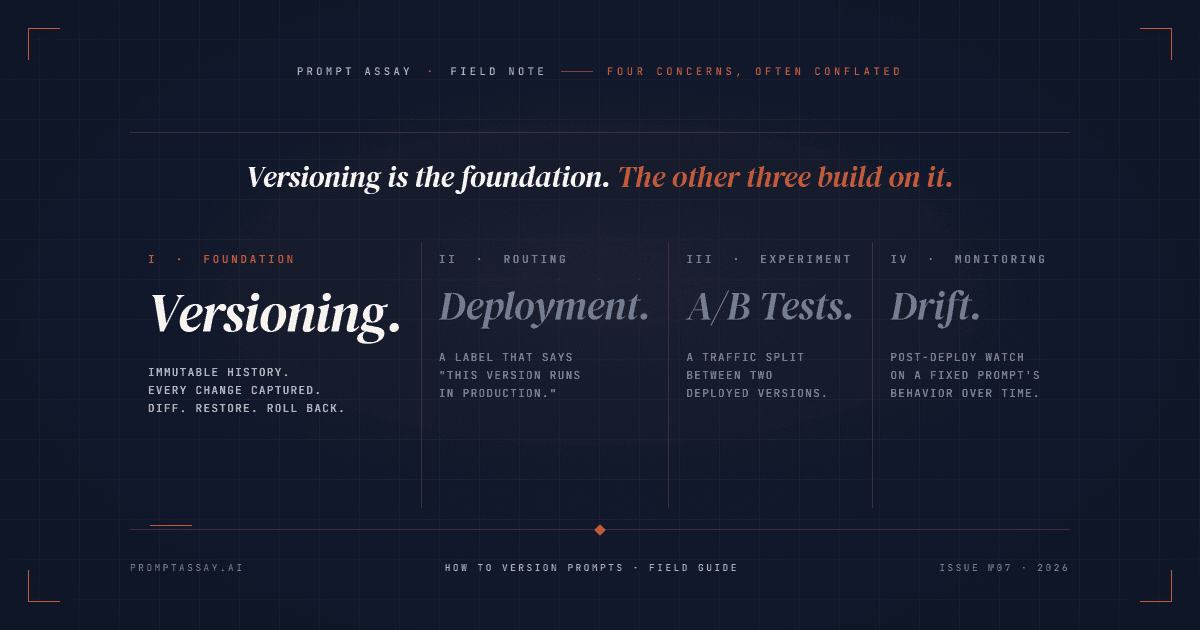
Prompt versioning treats every change to a prompt as an immutable artifact. Each version captures text, model, parameters, change rationale, and eval result; the history lets you diff, restore, and roll back without rewriting code. Versioning is the foundation; deployment, A/B testing, and drift detection all build on it.
On this page
What prompt versioning actually is (and what it isn't)
Most top-ranking pages for "how to version prompts" quietly conflate four separate concerns. Pulling them apart is the single biggest unlock for anyone setting up versioning for the first time.
- Versioning is the immutable history of every prompt change. v17 exists alongside v16 and v18 and can never be edited. This is the layer this article is about.
- Deployment is a label that says "this version is what production runs."
production = v17. Reassigning the label is how you ship and roll back. Versions don't move; labels do. - A/B testing is a traffic split between two deployed versions for a live experiment.
production_a = v17, production_b = v18, split = 50/50. Requires deployment first. - Drift detection is post-deploy monitoring of how the model's behavior on a fixed prompt changes over time. Doesn't change the version; tells you when a new version is needed.
If your current setup tries to solve all four with one mechanism (usually "we'll just edit the prompt file in git and hope"), you've conflated four problems. Versioning is the layer the other three rest on. Get it right first; the rest gets easier.
Step 1: Decide what every version must capture
A version that only captures the prompt text is half a version. To roll back safely, you need enough state to rebuild the exact behavior. At minimum, capture:
- Prompt text (system + user template, with variable placeholders left as-is)
- Model (
claude-opus-4-7,gpt-5.4,gemini-2.5-pro, with the exact model ID, not the family) - Parameters (temperature, max_tokens, top_p, stop sequences; some matter for reproducibility, some don't, but the version doesn't get to decide later)
- Change source (manual edit, AI-Improve apply, AI-Rewrite accept, restore-from-vN, branch, duplicate, import)
- Change rationale (one sentence on why; covered in Step 4)
- Eval result (a pointer to the test-case run that gated this version; covered in Step 6)
The mistake we see most often is teams capturing prompt text and nothing else. When a regression hits, "what changed" is answerable from the diff, but "why does this break with Claude 4.7 when v16 worked on 4.6" is not. Capturing the model and parameters as part of the version is the difference between a 30-second rollback and a half-day archeology dig.
Step 2: Pick where versions live
Three honest options. Pick by team size and editor population.
- Git plus markdown or YAML files. Works for solo developers and 1-2 engineer teams. You get diff, blame, branching, and PR review for free. Fails when non-engineers edit prompts (designers, PMs, ops people don't open VS Code), when label-based deployment is needed, or when eval results need to attach to a specific version. Ceiling is roughly four collaborators before merge friction starts to compound.
- Self-hosted prompt-management platform. Langfuse is the open-source default; you get versioning, labels, and a UI without giving up control. Best when the team has explicit OSS or self-host constraints, or when an in-house ops surface is the goal.
- Managed workbench. Prompt Assay, PromptLayer, LangSmith, and Latitude all sit here. The pitch is one surface for versioning, AI-assisted editing, two-version Compare, and eval suites. The cost is platform fees and vendor coupling.
There's no universally correct answer. Solo developers shipping their first production prompt should default to git. Teams of 4-plus where prompts have non-engineer editors should default to a workbench. Everyone else picks based on whether OSS-or-bust is a requirement.
Step 3: Adopt a numbering scheme
Three numbering schemes, in order of ceremony.
Auto-incrementing integers (v1, v2, v3). The default in Prompt Assay, Langfuse, and LangSmith. Zero overhead. The version number itself carries no information about the change; the change-summary entry does. This is the right default for almost every team.
Semantic versioning (1.2.0, 1.2.1, 2.0.0). Worth the ceremony only when downstream code branches on the prompt version. If your evaluation harness has a switch statement on prompt.version and v2 returns a different JSON shape than v1, SemVer earns its keep: 2.0.0 signals "consumers must update." If no downstream code differentiates, SemVer is theater. Most prompt teams don't need it.
Label-based references (prod, staging, v2-experiment). Not actually a numbering scheme; it's a deployment scheme that runs alongside versioning. LangSmith introduced Prompt Tags in October 2024, letting users pull a prompt by joke-generator:prod rather than commit hash. Langfuse and PromptLayer both ship the same label-based deployment pattern. Labels are how production resolves a version; they're not how versions are numbered.
If you remember one thing: numbering and labels solve different problems. Use auto-integers for the underlying version numbers; layer labels on top when you need deployment routing.
Step 4: Capture the why, not just the what
A diff tells you what changed. The change rationale tells you why. The version history of a team that captures only the what becomes illegible after three months: nobody remembers whether v12's rewrite of the system prompt was a tone adjustment, a hallucination patch, or a guardrail tightening.
Capture it as one sentence at version time, tied to a change-source taxonomy. An example version-history strip might look like this:
v17 · 2026-04-22 14:32 · ai-improve
  Improved Section II per six-dimension critique: Robustness 4 → 7 by
  adding explicit "If the input is empty, return null." Eval: 47/50 pass.

v18 · 2026-04-23 09:01 · manual
  Switched system-prompt model from claude-opus-4-6 to claude-opus-4-7.
  Tightened few-shot example #3 (Opus 4.7 read it more literally and
  copied the example output verbatim). Eval: 49/50 pass.

v19 · 2026-04-24 11:15 · restore (from v17)
  v18 broke billing classifier output shape downstream. Reverting while
  we re-validate the few-shot rewrite.
Three things make this legible: the change source (manual vs ai-improve vs restore), a single sentence on rationale, and the eval result pinned to the version. Prompt Assay captures the change source automatically and prompts for the rationale; in git, the discipline is on you. Either way, the rule is the same: a teammate three months from now should be able to read the strip and understand why each version exists. If they can't, the entry is incomplete.
For change summaries that name techniques (added few-shot examples, switched from CoT to direct, applied self-consistency), reach for the 60 prompt engineering techniques field guide as a shared vocabulary so summaries stay terse and consistent across the team.
See what auto-captured version provenance looks like in the editor. Free tier, no credit card.
Step 5: Diff and review changes
Side-by-side diff is table stakes. Prompt Assay uses the react-diff-viewer-continued widget; LangSmith Prompt Hub has a Diff View; Langfuse has version comparison in the UI; raw-git users get git diff. Pick the one your tool ships and stop debating it.
The harder skill is reading the diff. The subtle regressions are almost never in obvious places. What to look for:
- Quote-style flips (
'to"or smart-quote drift from a paste). Models tokenize them differently; some prompt patterns break silently when the inner-block delimiter changes. - Whitespace and newline boundary moves. The opening of a
<system_prompt>tag matters; an extra blank line before the first instruction can change attention weight enough to alter output for marginal cases. - Pronoun and tense shifts ("you should" to "you must," "we recommend" to "we require"). Cheap edit, large behavior delta.
- Few-shot example reorderings. The first and last examples carry disproportionate attention; reordering changes which pattern the model anchors to.
- Variable-placeholder edits that change the inferred type (
{{user_query}}to{{user_input}}looks identical but breaks any downstream code joining the strings).
A diff review takes 30 seconds for the obvious cases and three minutes for a careful pass. The three-minute pass catches the regressions that would take three hours to debug after they ship.
Step 6: Build rollback discipline
Rollback is the deliverable. In a workbench, restoring a prior version takes seconds. The all-tools floor is under five minutes; if yours is slower than that, your versioning isn't load-bearing yet, no matter how clean the history looks.
The mechanic varies by tool, but the property is the same: rollback creates a new version that points back to the old prompt text; it never rewrites the history.
- Workbench rollback (Prompt Assay, Langfuse, PromptLayer): select the version, click restore. The restore writes a new version (e.g., v19 = "restore from v17") so the audit trail is preserved. Time to rollback: under a minute.
- Label-reassignment rollback (Langfuse, LangSmith, PromptLayer): point the
productionlabel at the older version. Existing versions don't change; only the deployment pointer moves. Time to rollback: under a minute, and code paths that resolveprompt:prodpick up the change on next call. - Git-revert rollback: revert the commit, redeploy. Time depends on your CI; expect 5-15 minutes including the deploy gate.
The sub-step everyone skips: version on every model update. When Anthropic ships Claude Opus 4.7 or OpenAI ships a GPT minor revision, frontier models can interpret prompts more literally than the prior generation, and parameters that one version accepted may get rejected by the next. We've watched this exact pattern bite production prompts that worked the day before. The discipline: when a new model lands, run your existing prompts against it and commit the comparison as a new version BEFORE you flip the production label. Versioning here is what gives you a clean A/B baseline against the regression.
Versions plus a regression suite plus an LLM-as-judge grader is the gating pattern that keeps prompt changes from shipping silent breaks. Versioning is the upstream layer; the regression article covers the eval gate that consumes it.
Try the two-click restore in the editor. Free tier, no credit card.
Step 7: Where this lives in your stack
Tier-fit framing, honest about boundaries:
- Solo developer, first production prompt. Git plus markdown. Or Prompt Assay's free tier (with the caveat: the free tier surfaces the last 7 days of version history. Older versions are retained, never deleted, but they don't appear in the UI or API and you can't restore or branch from them until you upgrade. The discipline ships at every tier; the retained-history surface is the upgrade.)
- Solo engineer shipping continuously. Solo $49/mo unlocks the full retained version history. The platform fee is flat; provider inference goes direct to your Anthropic, OpenAI, or Google account via BYOK. The first time a regression hits and the version you need is older than a week, the upgrade pays for itself.
- Multi-engineer team (2-20). Team $99/seat/mo. The price reflects the actual workload: shared workspace, role-based access, audit log, org-scoped API keys. Multi-engineer collaboration is what changes the cost curve, not the seat count itself.
- Compliance-driven enterprise. Enterprise (custom) for SSO, BAA/DPA, and procurement-friendly contracts. The same discipline; different paperwork.
- Open-source-or-self-host constraint. Langfuse self-host. You give up the AI pair, the two-version Compare, and the integrated eval surface; you keep your data and infrastructure. Trade-off worth making for some teams; not worth making for most.
Compare tier shapes side-by-side.
Your version history is yours, or it isn't
Humanloop announced shutdown on August 13, 2025 and sunset on September 8, 2025; existing customers had under four weeks to migrate prompts and version history before all data was permanently deleted. The teams that owned exportable artifacts walked. The teams that didn't lost history.
The lesson is a design constraint, not a war story: pick a tool that exports prompts AND version history in a portable format. Prompt Assay's .prompt exporter is one such surface; the Humanloop migration guide walks the export pattern in detail. Workbench tools are convenient; portability is the contract that keeps the convenience honest.
Frequently Asked Questions
Reader notes at the edge of the argument.
Ship your next prompt or Skill in the workbench.
Prompt Assay is the workbench for shipping production prompts and Agent Skills. Version every change. Critique, improve, evaluate across GPT, Claude, and Gemini. Bring your own keys. No demo call. No card. No sales gate.
Further Reading
- №10·May 2026
What is an Agent Skill?
An Agent Skill is a versioned folder of instructions and resources an LLM agent loads on demand. How Skills work, and how they differ from prompts and MCP.
Prompt Engineering·19 min read - №03·April 2026
Sixty prompt engineering techniques, organized
A 2026 field guide to the 60 prompt engineering techniques worth knowing, organized into 10 workflow families with canonical examples from The Prompt Report.
Prompt Engineering·13 min read - №12·May 2026
Prompt drift: a 2026 detection playbook
Prompt drift is when output quality changes over time even though the prompt didn't change. The 2026 cadence, three causes, and a four-step playbook.
Evaluation & Testing·13 min read
Issue №06 · Published MAY 20, 2026 · Prompt Assay